
Getting started at Snatch Casino involves two straightforward steps: creating an account and signing in. The details matter, though. UK players should check that the casino is available to them, read its terms, and understand its approach to deposits, withdrawals and responsible gambling before registering. This guide explains the usual login and registration process, what to check along the way, and how to handle common account issues.
Before you register
First, make sure you are using the casino’s genuine website. Follow a trusted link or enter the address carefully rather than relying on a message or advert. Check the site’s footer for its operator details, licensing information and terms. Availability and rules can change, so UK visitors should confirm that the service accepts customers resident in Great Britain and that the applicable authorisation is valid. Do not assume that a site is authorised simply because it loads in a UK browser.
You must meet the legal age requirement to gamble in Great Britain: 18 or over. Registration details should be accurate and match your identity documents and payment account. Incorrect information can delay verification or prevent a withdrawal. Before depositing, also review the casino’s bonus conditions, transaction limits, accepted payment methods and withdrawal rules. These checks take only a few minutes and can prevent avoidable problems later.
How to register an account
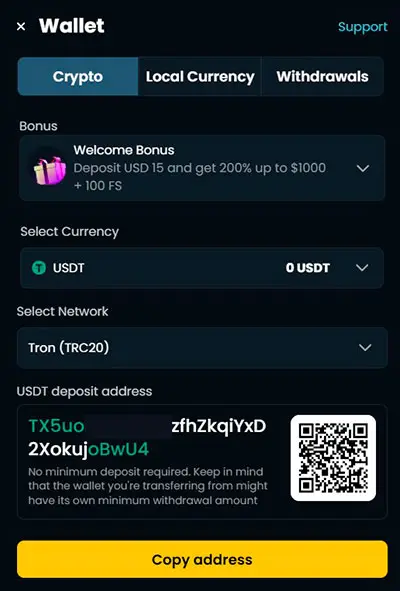
- Open the official site. Use the casino’s verified address and look for a button labelled “Register”, “Sign Up” or similar.
- Enter your details. The form may ask for your name, date of birth, address, email address and mobile number. Use your real information and check it before submitting.
- Create login credentials. Choose a unique password that you do not use for email, banking or other casino accounts. If the site offers additional account security, consider enabling it.
- Set your preferences. You may be asked about marketing messages and responsible gambling limits. Read each option and choose what suits you; promotional consent should not be confused with account security.
- Confirm your details. The casino may send a verification link by email or a code by text. Use the message sent to the address or number you provided.
- Complete any requested checks. Identity and age verification may be required before you can deposit, play or withdraw. Submit documents only through the casino’s secure account area or another verified channel.
Do not create extra accounts to get around a restriction or claim an offer more than once. Duplicate accounts can breach the terms and may complicate access to funds. If the form rejects a valid detail, contact support rather than entering a different birth date, address or payment identity.
Snatch Casino login: signing in safely
Once registration is complete, select “Login” or “Sign In” and enter the email address or username and password linked to your account. Some casinos also request a one-time code, particularly when a new device or location is detected. Enter that code only on the official site, and never share it with someone claiming to be support.
If you are using a shared computer, do not save your password in the browser. Sign out when finished and close the window. On a personal device, keep its operating system and browser updated, protect it with a screen lock, and avoid logging in over public Wi-Fi when handling payments or identity documents.
Forgotten password or locked account
Use the “Forgot password?” link on the login page. The casino will typically send a reset link or verification code to your registered email address or phone. Check junk and spam folders if the message does not appear, and make sure you have entered the address associated with the account. Create a new, strong password and do not reuse an old one.
Repeated failed attempts may temporarily lock an account. Wait for the stated period or contact customer support through the official website. If you no longer control the registered email or phone, tell support and be ready to verify your identity. Do not open another account as a workaround. If you suspect someone else has accessed your profile, change your password from a secure device and alert the casino promptly.
Account verification and withdrawals
Online casinos may need to verify a customer’s identity, age, address and payment method. This is a routine compliance step, not a guarantee that every submitted document will be accepted immediately. Common requests include a photo ID, proof of address and evidence that a payment method belongs to you. The casino should explain what is needed and how to submit it securely.
Make sure document images are readable, complete and current. Do not edit them or send sensitive files to an unverified email address. If a withdrawal is pending, check the cashier section and the published processing times. The casino may need to finish verification or review the transaction first. For a delay, ask support for the specific reason and an estimate; keep a record of the date and any reference number.
Offers, deposits and safer play
Promotions can include deposit matches, free spins or other incentives, but their value depends on the terms. Read the minimum deposit, wagering requirement, eligible games, maximum bet, expiry date and withdrawal restrictions before opting in. Check whether a bonus is applied automatically or must be activated. If you are unsure, ask support to explain the terms in writing before making a deposit.
Where a promotion permits it, reward code use at casino checkout may be required to activate an offer. Enter a code only in the designated field on the genuine cashier or promotions page, and confirm that the offer appears in your account before depositing. Never treat a code as proof that a promotion is legitimate or that a site is properly authorised.
Set a gambling budget and time limit before playing, and do not use money needed for bills or essentials. Take a break if gambling stops feeling like entertainment. UK players can use available account tools such as deposit limits, time-outs and self-exclusion; the exact tools depend on the operator. If gambling is causing harm, contact a recognised UK support service such as GamCare or the National Gambling Helpline.
Common registration and login problems
- Verification email not received: Check your spam folder, confirm that the email address was entered correctly, and request a new message from the official site.
- Registration form will not submit: Review required fields and ensure your details match your documents. Try an updated browser, but avoid repeatedly sending the form if it reports an error.
- Login details not recognised: Check for typing errors, caps lock and saved passwords that may be out of date. Use the password reset process if needed.
- Account access restricted: Contact support for the reason and next steps. Restrictions can relate to verification, security checks, location rules or safer gambling settings;
- Payment method declined: Confirm that the method is accepted, the account details match, and your bank or payment provider permits the transaction. Do not keep retrying if you suspect a security issue.
Questions and answers
Can I register from anywhere in the UK?
That depends on the casino’s current terms, its operating permissions and any location restrictions. Check the official terms for your part of the UK before signing up. A site being accessible does not, on its own, confirm that it is authorised to provide gambling services there.
Can I use someone else’s payment method?
Casinos commonly require deposits and withdrawals to use a payment method in the account holder’s name. Using another person’s card or account can trigger a security review or breach the terms. Ask the casino before attempting a transaction if you are unsure.
What should I do if my account is under review?
Read any message in your account or email, provide only the requested information through a secure channel, and ask support what remains outstanding. Avoid creating another account or making repeated deposits while the issue is unresolved.
Can I close my account after registering?
Contact support or use the account controls to request a temporary break or permanent closure. If you want to stop gambling, consider self-exclusion and support options rather than simply deleting an app or ignoring the account.
Final checklist
Before registering at Snatch Casino, verify that the service is suitable and authorised for you in the UK, read the terms, and check the operator’s contact and complaints information. During sign-up, provide accurate details and secure your password. After logging in, complete requested verification through official channels, understand any promotion before accepting it, and set limits that keep gambling within your budget. If you cannot access your account or a withdrawal is delayed, use the casino’s verified support route and keep a clear record of the conversation.